
Dalam lingkungan bisnis dan pendidikan modern saat ini, papan tulis interaktif telah menjadi alat yang sangat diperlukan untuk mengajar, presentasi, kolaborasi, dan manajemen konten digital. Perangkat sepertiQtenboardPapan tulis interaktif memungkinkan pengguna untuk mengganggu, membagikan, dan berinteraksi dengan konten dengan mulus.
Sementara kualitas layar, kecepatan untuk menanggapi sentuhan, dan ukuran layar sering menarik perhatian, faktor penting lainnya yang mempengaruhi kinerja adalah antarmuka USB. Port USB memungkinkan koneksi antara papan tulis interaktif dan komputer, kamera, perangkat penyimpanan, dan periferal lainnya. Konektivitas ini penting untuk mentransfer konten, bermain video definisi tinggi, atau mengunggah berkas proyek secara efisien.
Saat ini,Bangku 2.0 USBDanBangku 3.0 USBAdalah dua antarmuka yang paling umum untuk papan tulis interaktif. Memahami perbedaan antara kedua standar ini sangat penting bagi profesional yang ingin memaksimalkan efisiensi transfer data, mengurangi latensi, dan memastikan pemutaran konten berkualitas tinggi pada perangkat sepertiQtenboardPapan tulis interaktif.
Artikel ini mengeksplorasiBangku 3.0 USBVs2.0Dalam konteks papan tulis interaktif, termasuk kinerja, kecepatan, kompatibilitas, dan kasus penggunaan terbaik, sementara menegaskanQtenboardSolusi yang mendukung kedua standar.
USB (Universal Serial Bus) adalah antarmuka standar yang digunakan untuk transmisi data dan komunikasi perangkat. Pada papan tulis interaktif, port USB melayani berbagai tujuan:
UntukQtenboardPapan tulis interaktif, port USB direkayasa untuk mendukung keduanyaBangku 2.0 USBDanBangku 3.0 USB, Memberikan fleksibilitas untuk mengakomodasi berbagai perangkat dan kebutuhan pengguna. Memilih standar USB yang tepat dapat secara langsung mempengaruhi performa, terutama ketika menangani file besar atau pemutaran video HD.
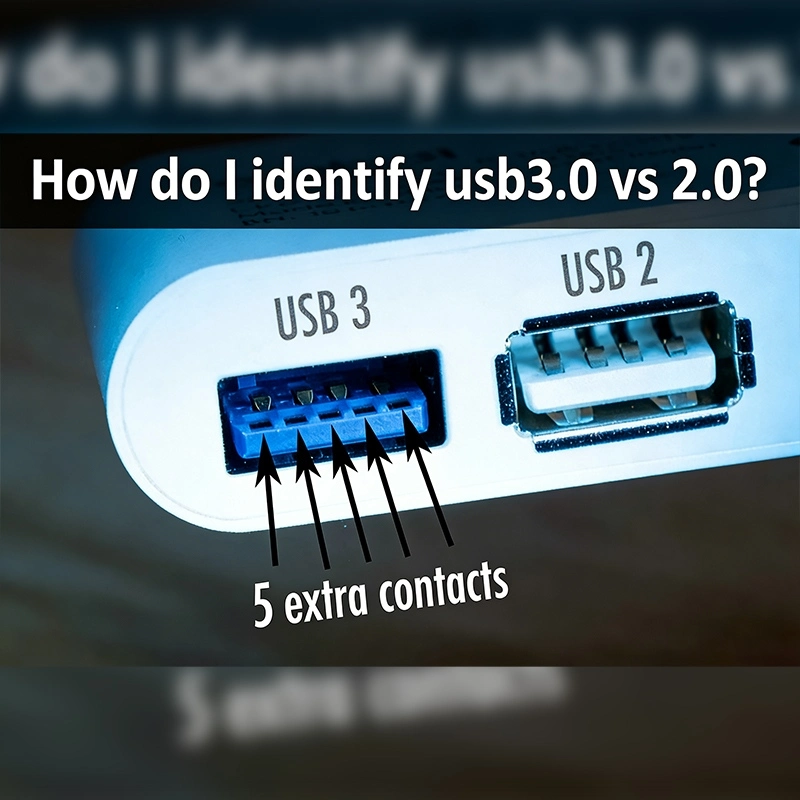
SementaraBangku 2.0 USBDanBangku 3.0 USBBagikan tujuan dasar transmisi data, produk tidak identik. Perbedaan ada dalam hal:
Untuk periferal kantor sehari-hariBangku 2.0 USBCukup untuk perangkat seperti keyboard dan mouse. Namun, ketika mentransfer file besar, video HD, atau konten multimedia ke papan tulis interaktif,Bangku 3.0 USBMemberikan keuntungan kinerja yang signifikan.
UntukQtenboardPapan tulis interaktif, mendukung keduanyaBangku 2.0 USBDan3.0Memastikan pengguna dapat memilih antarmuka terbaik berdasarkan kompatibilitas perangkat, ukuran konten, dan persyaratan kecepatan transfer.
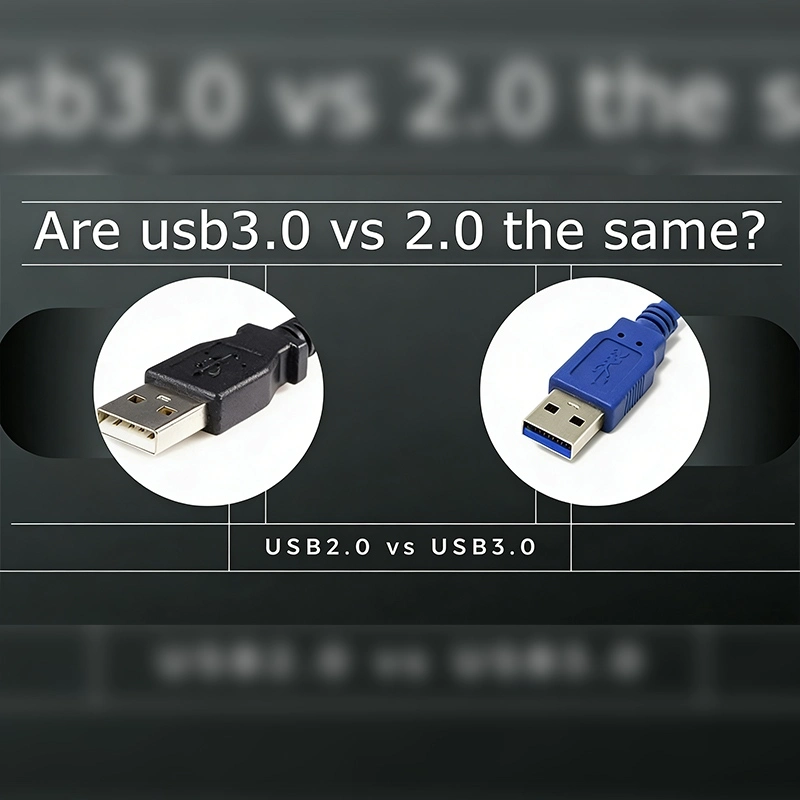
Bangku 2.0 USB: Biasanya memiliki antarmuka Putih dan 4 pin.
Bangku 3.0 USB: Sering berwarna biru dengan logo "SS" (SuperSpeed) dan 9 pin diatur dalam dua lapisan.
Perbedaan ini bukan hanya Kosmetik-yang mengindikasikan adanya potensi untuk laju transfer data yang lebih cepat dan komunikasi dua arah dalamBangku 3.0 USB.
Bangku 2.0 USB: Menggunakan transfer setengah dupleks, memungkinkan data mengalir hanya dalam satu arah pada satu waktu.
Bangku 3.0 USB: Mendukung transfer full-duplex, memungkinkan pengiriman dan penerimaan data bersamaan.
Untuk papan tulis interaktif, ini berarti Anda dapat mengirim konten resolusi tinggi dari komputer Anda ke papan sambil menerima data interaksi atau umpan balik pada saat yang bersamaan.
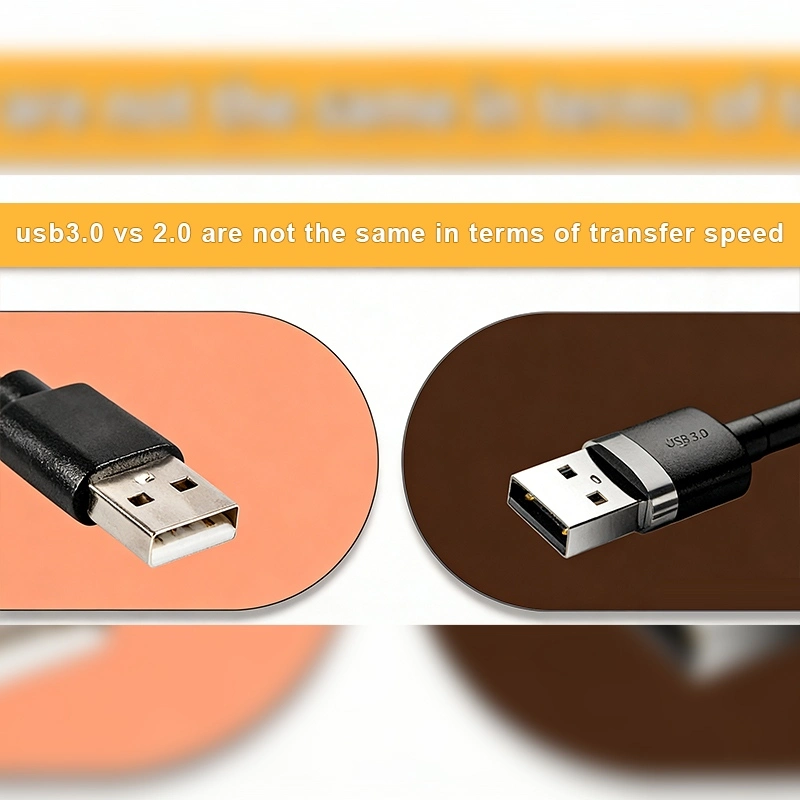
Bangku 2.0 USB: Kecepatan jelas maksimum dari480 Mbps
Bangku 3.0 USB: Kecepatan jelas maksimum dari5 Gbps(Lebih dari 10 kali lebih cepat)
Praktis, mentransfer file video besar melaluiBangku 2.0 USBMungkin memerlukan waktu 20 detik, tetapiBangku 3.0 USBDapat menyelesaikan transfer hanya dalam3-4 detik. Ini penting untuk papan tulis interaktif di pusat bisnis, kelas, dan kantor kolaborasi di mana konten harus diperbarui dengan cepat.
Bangku 2.0 USB: Cocok untuk periferal berkecepatan rendah, printer, keyboard, dan transfer file kecil.
Bangku 3.0 USB: Dirancang untuk tampilan HD, kamera, perangkat penyimpanan, dan papan tulis interaktif profesional.
QtenboardMemanfaatkan papan tulis interaktifBangku 3.0 USBUntuk mendukung presentasi HD besar, pemutaran multimedia, dan pembaruan konten cepat, selagi masih tetap kompatibel denganBangku 2.0 USBPerangkat.
Bangku 3.0 USBKompatibel dengan belakangBangku 2.0 USB. Ini berarti aBangku 3.0 USBPerangkat dapat terhubung keBangku 2.0 USBPort, tetapi kecepatan transfer akan default keBangku 2.0 USBBatas.
UntukQtenboardPapan tulis interaktif, kompatibilitas ke belakang memastikan:
Kode Warna:
Jumlah Pin:
Identifikasi yang benar memastikan pengguna dapat memaksimalkan kinerja papan tulis interaktif dengan memilih antarmuka yang sesuai untuk transfer data berkecepatan tinggi.
QtenboardPapan tulis interaktif dirancang untuk memberikan fleksibilitas maksimum. Beberapa keunggulan termasuk:
Dengan kebangkitan konten resolusi tinggi, integrasi cloud, dan fitur interaktif, papan tulis interaktif di masa depan akan mendapat manfaat dari:
QtenboardSudah mengintegrasikan antarmuka USB canggih ke dalam papan tulis interaktif mereka untuk mendukung tren ini, memastikan umur panjang dan kinerja dalam lingkungan profesional dan pendidikan.
Memahami perbedaan antaraBangku 3.0 USBDan2.0Sangat penting untuk memaksimalkan efisiensi papan tulis interaktif. UntukQtenboardPapan tulis interaktif, mendukung standar USB memastikan:
Bagi profesional, pendidik, atau perusahaan berencana untuk mengadakan papan tulis interaktif, memilih aQtenboardPapan tulis interaktif dengan keduanyaBangku 2.0 USBDan3.0Dukungan menjamin transfer konten berkecepatan tinggi, pemutaran multimedia yang lancar, dan pengalaman interaktif yang unggul.
Dengan menggabungkan antarmuka USB canggih, panel LCD yang kuat, dan teknologi sentuh kelas profesional,QtenboardTerus menetapkan standar untuk papan tulis interaktif berkinerja tinggi secara global.
Klik untuk membaca rincian produk dan mempelajari tentang fitur fungsional dan kinerja fisiknya.
📖Baca produk
 ID
ID
 EN
EN  MAY
MAY  TH
TH  CHT
CHT  BUR
BUR  FIL
FIL  HKM
HKM  LAO
LAO  SIN
SIN  VIE
VIE